
SmartCraft Connect MFD Integration Kits
Display Mercury SmartCraft Engine Data on Compatible Marine Displays
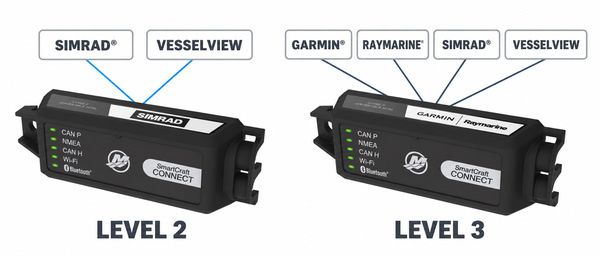
Mercury SmartCraft Connect allows compatible Mercury and MerCruiser engines to share available engine information with supported multi-function displays. Choose between Level 2 and Level 3 based on the display brands and models installed on your boat.
Installing a Next Generation VesselView? VesselView 705, 905 and 1005 displays require a compatible SmartCraft Connect gateway. Level 2 is normally the appropriate and more economical choice if you're just using a VesselView display and not planning on connecting to a Garmin or Raymarine device.
Choose the Right SmartCraft Connect
Choose Level 2 for a Next Generation VesselView or compatible Simrad® display that will remain installed. Choose Level 3 for Garmin®- or Raymarine®-only systems, or when broader display flexibility is preferred.
SmartCraft Connect Level 2
Next Generation VesselView and Compatible Simrad® Displays
Level 2 is normally the appropriate and more economical choice for a Mercury VesselView 705, 905 or 1005. It must be activated by a compatible Simrad or Mercury VesselView display, and that display must remain installed for continued operation.
- Recommended for Next Generation VesselView 705, 905 and 1005 displays
- Compatible with Mercury VesselView 704
- Compatible with supported Simrad NSX, NSX Ultrawide and NSS 4 displays
- Not intended for Garmin- or Raymarine-only installations
SmartCraft Connect Level 3
Broadest Garmin®, Raymarine®, Simrad® and VesselView Compatibility
Level 3 provides broader display flexibility and does not require a particular display brand for activation. Choose Level 3 for Garmin- or Raymarine-only systems, or when the ability to use different supported display brands is preferred.
- Broadest compatible display selection
- Suitable for supported Garmin, Raymarine and Simrad displays
- Compatible with Next Generation VesselView 705, 905 and 1005 displays
- Level 3 is compatible with Next Generation VesselView, but is not required when Level 2 meets the installation requirements
The correct SmartCraft Connect depends on your display brand, display model, engine configuration and installation location. SmartCraft Connect Level 2 and Level 3 provide different display compatibility, so verify your complete system before ordering.
Mercury VesselView 705, 905 and 1005 displays require a compatible SmartCraft Connect gateway to access SmartCraft engine information and supported controls. SmartCraft Connect Level 2 is normally the appropriate and more economical choice for these displays. Level 3 is also compatible but is generally selected when broader Garmin®, Raymarine® or Simrad® display flexibility is needed.
Not sure which model you need?
Read our SmartCraft Connect Guide →
Display and engine compatibility must be verified before purchasing. Available information and controls depend on the engine, display, installed sensors, software and SmartCraft network configuration.

